A wooden desk fails in one of two ways, and they have nothing to do with each other. Either it wobbles — a joinery problem — or the top cups and twists, which is a wood-movement problem. Diagnosing which one you have is the whole job, because the fixes have nothing in common.
Put a straight edge across the top from front to back. If it rocks, the desk has a joint problem and the top is fine. If the straight edge shows daylight in the middle or at the edges, the top has cupped, and no amount of tightening will help — the top has to be allowed to move, or flattened and then allowed to move.
Anatomy of a wooden desk
- Top — solid boards glued edge to edge, or a butcher-block slab, or veneer over a core.
- Apron or stretchers — the rails tying the legs together. A desk with no stretchers relies entirely on the leg-to-top joint, which is why it racks.
- Legs or a frame — four legs, a pair of trestles, a pedestal, or a steel sit-stand base.
- Top fasteners — the clips or slotted brackets holding a solid top to the frame. As on a dining table, this is the part that decides whether the top survives.
- Modesty panel — the panel across the back. Adds a surprising amount of rigidity.
- Grommets and cable trays — retrofittable, and the difference between a desk and a nest of cables.
The heights that decide whether you can work at it
Desk height is the one dimension where the standard is a compromise rather than a rule. Standard desks are built to suit an average, and most people are not average.
| Use | Height | Notes |
|---|---|---|
| Standard desk | 29–30 in | Suits roughly 5 ft 10 in with a standard chair |
| Typing / keyboard height | 26–28 in | Elbows at about 90 degrees |
| Standing (average adult) | 42–46 in | Varies more than any other figure here |
| Minimum knee clearance | 24–25 in | Under the apron, not under the top |
| Minimum legroom width | 20 in | Between pedestals or leg faces |
The test that matters is not a number. Sit down, drop your shoulders, and let your forearms rest level. If your wrists bend up to reach the keyboard, the surface is too high — and lowering a chair to fix a high desk simply moves the problem to your knees.
Depth, and the two-monitor question
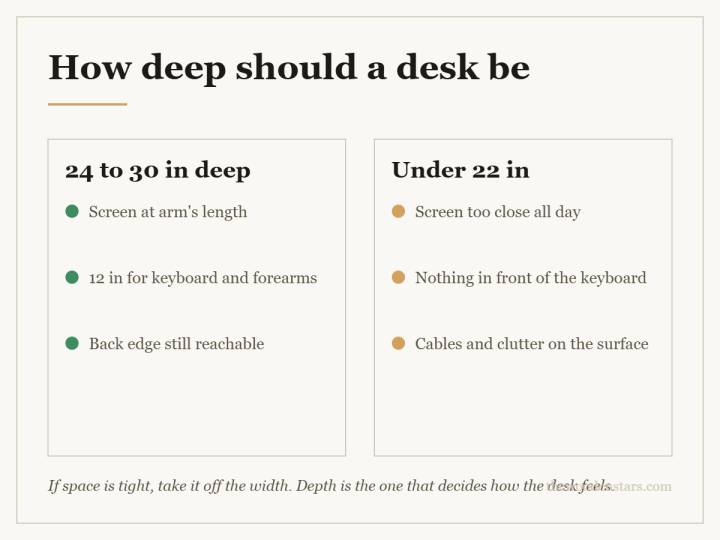
Desk depth is where people under-buy. A single laptop is happy at 24 inches. Two monitors are not: you need enough depth to sit them far enough back that you are not turning your head to scan across them.
- 24 in — laptop, or a single small monitor. Cramped with anything on arms.
- 27–30 in — a single large monitor, or two monitors on a stand.
- 30 in and over — two monitors on arms, comfortably.
Width follows from that: about 24 inches of width per monitor, plus room for anything you actually write on.
Butcher block and the sit-stand crossover
The most common wooden desk bought today is not sold as a desk at all — it is a butcher-block worktop on a steel sit-stand frame. It is a genuinely good combination, and it has two traps.
- Thickness. Slabs run roughly 1 to 1.75 inches. Thinner slabs on a wide span will flex and, over time, sag.
- Fixing. A steel frame bolted rigidly through a solid slab stops the slab moving across its width. Solid wood will move; the frame has to allow it. This is the single most common cause of a cupped butcher-block desktop, and it is entirely preventable with slotted holes or clips.
The same logic applies to any solid top on any rigid base. Rigid frame plus solid top plus tight bolts equals a split or a cup, every time.
Which species belong on a desk top
A desk sees less water and heat than a dining table but far more abrasion in one small area — where your forearms rest and where a chair back hits the edge.
- Maple and birch — the classic butcher-block woods. Hard, pale, fine grained, and they show every coffee ring, which is either honesty or annoyance.
- Oak — harder-wearing in appearance because the open grain hides marks.
- Acacia — extremely common as an affordable slab. Check what the label means; see wood types.
- Bamboo — technically a grass, behaves like a hard, very stable panel. Excellent for wide spans; unforgiving to refinish.
- Pine — will pick up the imprint of anything you write on. Charming, and a poor choice under a mouse.
Solid, engineered or veneer
- Solid slab — refinishable, needs to be allowed to move, heavy.
- Veneer over plywood — very stable, ideal for a wide unsupported span, one careful refinish at most.
- Melamine or laminate over particleboard — flat, cheap, and finished forever the moment it chips. Fine as a working surface, not as a piece of furniture.
What goes wrong, and why
- Wobble. Diagonal racking, because there are no stretchers or the leg-to-apron joints have loosened. Tighten diagonally, not one leg at a time.
- A cupped top. One face of the slab has taken up or given off moisture faster than the other — usually because the underside is unfinished while the top is sealed. Finish both faces.
- A sagging middle on a wide desk. Span exceeds what the slab’s thickness can carry. A stretcher or a centre leg fixes it; nothing else will.
- A standing desk that has developed a tilt. Almost always the frame, not the wood — one column out of sync. Re-run the frame’s reset procedure before suspecting the top.
- A worn patch where forearms rest. Finish wear, not wood wear. Recoat that panel and it disappears.
Parts you can actually replace or add
- Legs — hairpin, tapered or steel, nearly all through a standard mounting plate. The easiest whole-desk transformation there is.
- A sit-stand frame under an existing solid top — provided you fix it with slotted holes.
- Stretchers — retrofitting a back stretcher to a racking desk costs a length of timber and four screws.
- Grommets and under-desk cable trays — bought to a hole size, fitted with a hole saw.
- Levelling feet — for a desk that rocks on an uneven floor, which is genuinely a floor problem rather than a desk problem.
Before you buy
- Set the height you actually need before you shop, by measuring your own seated elbow height. The standard is a starting point, not an answer.
- Buy for depth before width. Depth is what you cannot add later.
- For any solid top on a rigid frame, confirm the fixing allows movement. Ask if the listing does not say.
- Check the slab thickness against the unsupported span.
- If it is going upstairs, measure the turn. A 60-inch slab is a two-person carry and does not pivot.
Questions we get asked
Is a butcher-block top good for a desk?
Very — it is hard, thick, repairable and cheap for the size. It only goes wrong when it is bolted down rigidly, which stops it moving and makes it cup.
Do I need to finish the underside of a wooden desktop?
Yes, and it is the step most people skip. An unfinished underside exchanges moisture with the room at a different rate from the sealed top, and the slab curls towards the drier face.
What height should a standing desk be?
Whatever puts your elbows at roughly a right angle with your shoulders relaxed. Published averages are a wide band because human proportions are; measure yourself standing at a counter and work from that.
Can I cut a hole in a solid wood desktop for cables?
Yes. Keep it away from the ends and away from a glue line, and fit a grommet so the exposed end grain is sealed.
My desk wobbles only when I type. Is that the legs?
Typing loads the desk diagonally, which is exactly what a desk with no stretchers cannot resist. If it is rock solid when pushed straight down and wobbles when pushed sideways, you need a stretcher, not tighter bolts.